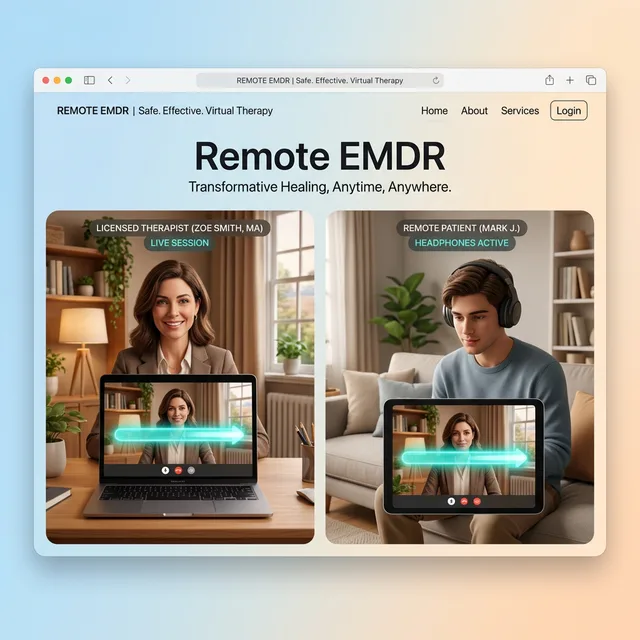
Share a session code with your client — they open the same app for free, put on headphones, and you control the bilateral stimulation in real-time from your screen. Works face-to-face too, with just a pair of headphones.
Developed by Murat Yön, clinical psychologist and EMDR Europe accredited therapist.
Therapist and client in separate locations
Same room — one device, one pair of headphones
💡 Ideal for clinic settings. Works without internet.
Changes sync instantly · Secure connection · Session content is never recorded
Designed for therapists' needs. Simple, secure, and powerful.
Wherever your client is, manage BLS control in full sync from your own device.
Connect headphones to your device and deliver auditory BLS directly to your client.
One-tap login with Google and Apple. All your data is securely protected.
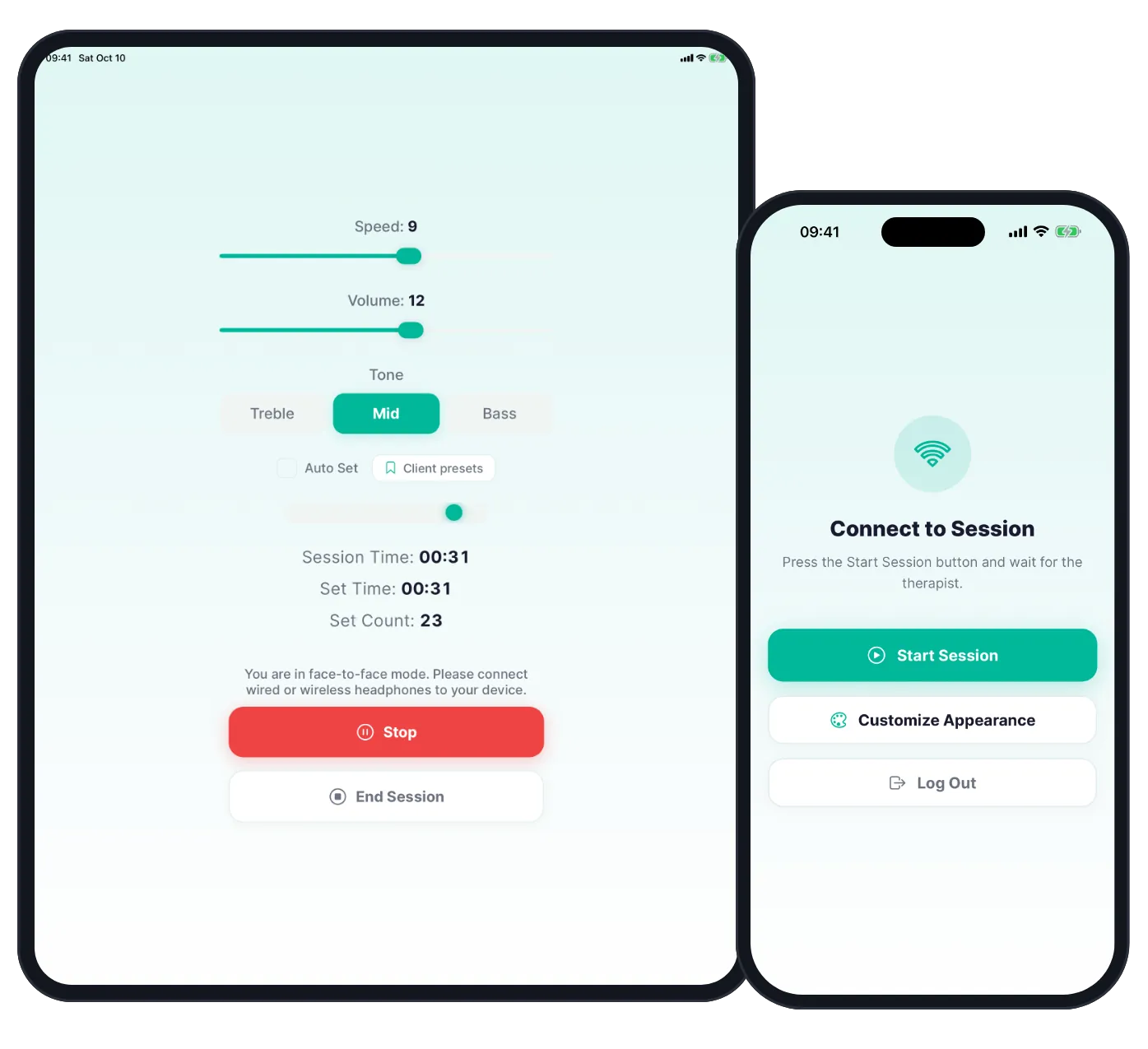
Adjust speed, tone, set count and session duration in real time.
Turkish, English, German, French and more. Ready for international use.
Phone, tablet and desktop. One subscription, all platforms.
Try BLS in your browser for free. Subscribe when you want the app for face-to-face or online sessions.
Free
No account, nothing to install. Sound and light bar in your browser.
Free online BLS tool for EMDR, no account$2.99 / month
or $34.99 / year
Always free
Your client installs the app and joins with your link or session code. No account, no payment.
Prices from the US App Store. The App Store or Google Play shows the exact price in your currency before you subscribe.
"No need to carry devices during EMDR sessions anymore. Thanks to this app, I no longer have to transport equipment between different clinics."
"Found it for BLS. Used it with my clients both online and face-to-face. Very successful, great work by the team."
"Very easy to use. Tested the 7-day free trial in both face-to-face and online sessions. I'll keep using it."
"I had been looking for a useful BLS tool for a long time. I highly recommend it to all EMDR practitioners."
"I use a Mac and the macOS compatibility is excellent. I can control the session from my screen while meeting with clients."
No audio, video, notes or client details are stored. Stimulation is generated on the devices.
EMDR Mobile does not carry video. Keep using Zoom, Teams, Meet or the platform you already use.
Your account email and name, your session username and code, and during online sessions the start, stop, speed, tone and volume commands. Stored in Google Firebase.
Clients join with your link or session code. They never create an account or enter personal details.
Share a session code during your video call. Your client opens the app, puts on headphones — you control BLS from your screen while seeing their face on Zoom or Teams.
Plug any headphones into your phone or tablet, hand them to your client. Control speed, tone and sets from your screen — no internet needed, no extra device.
Log in on any device — your personal phone, the clinic tablet, or your desktop. Your subscription and session login come with your account; client presets stay on the device where you saved them.
Your subscription is tied to your account. Your sessions are ready on any device.
Subscribe on mobile, log in to desktop with the same account. Subscription and session data sync instantly.
EMDR Mobile is a professional bilateral stimulation (BLS) control app for EMDR therapists. It lets you manage online and face-to-face therapy sessions from your phone, tablet or desktop computer.
Yes. Share session credentials with your client and control bilateral stimulation remotely in real time. Works alongside any video platform (Zoom, Teams, etc.).
For online sessions, clients download EMDR Mobile — the same app, free — and log in via Client Login with the credentials you share. No subscription required. For face-to-face sessions with headphones, only the therapist's device is needed.
EMDR Mobile is designed around GDPR and KVKK. No session content, audio, video or client personal data is stored. Only your account (email and name) and your session code are kept in Google Firebase, and online sessions send just start, stop, speed, tone and volume commands.
After the trial, you can continue with a premium subscription purchased through the App Store or Google Play. Your settings are preserved and the subscription activates across all platforms automatically.
EMDR Mobile supports 12 languages: English, Turkish, German, French, Spanish, Italian, Portuguese, Dutch, Polish, Russian, Arabic and Japanese.
Yes. Your mobile subscription automatically unlocks the macOS and Windows desktop applications. One account, all platforms — no extra cost.
EMDR Mobile works on iPhone and iPad (iOS 14+), Android phones and tablets (Android 8+), macOS (Apple Silicon and Intel), and Windows 10/11.
Step into the world of EMDR Mobile with a 7-day free trial.
Scan with your phone camera to open EMDR Mobile on your phone
Desktop App v1.4.0